A smart home used to mean a few novelty gadgets and a lot of frustration. In 2026, the picture is far more mature. Devices are easier to set up, more of them work together across brands, and the best ones solve real problems: saving energy, improving security and removing small daily annoyances.
This guide covers the best types of smart home devices in 2026, how to choose between ecosystems, and what to consider for security and privacy. We have not hands-tested the products mentioned, and model lineups, prices and features change often, so we focus on device categories and well-known brands, and recommend you check current specifications before buying.
Start With the Ecosystem, Not the Gadget
The most common smart home mistake is buying devices one at a time without thinking about how they connect. Before you buy, decide which ecosystem you want to build around.
The main smart home ecosystems
- Amazon Alexa: wide device support and a broad range of Echo speakers and displays.
- Google Home / Gemini for Home: strong with Android phones, Google services and Nest products.
- Apple Home: good for iPhone users who value privacy and tight integration with Apple devices.
- Samsung SmartThings: works well with Samsung appliances and many third-party devices.
- Home Assistant: a powerful open-source platform for enthusiasts who want local control.
What is Matter?
Matter is an industry standard designed to let smart home devices from different brands work together across platforms such as Apple Home, Google Home, Alexa and SmartThings. It aims to reduce lock-in and simplify setup. Look for the Matter logo when buying, but check what each device actually supports, because Matter does not yet cover every device type or every feature, and some functions may still need the brand’s own app.
Quick Comparison of Smart Home Categories
| Category | Best for | Typical benefit | Things to check |
|---|---|---|---|
| Smart speakers and displays | Voice control and a home hub | Central control and quick info | Privacy settings and ecosystem |
| Smart lighting | Convenience and ambience | Schedules, scenes and energy savings | Bridge requirements and Matter support |
| Smart thermostats | Energy savings | Learning schedules and remote control | Compatibility with your heating system |
| Video doorbells and cameras | Security | Alerts and remote viewing | Subscription costs and storage options |
| Smart locks | Keyless entry | Access codes and activity logs | Compatibility with your door and backup access |
| Smart plugs | Cheap starter devices | Control ordinary appliances | Energy-monitoring features and safety certification |
| Smart smoke and leak detectors | Safety | Early alerts on your phone | Power source and certification |
| Robot vacuums | Convenience | Automated cleaning | Navigation, maintenance and app quality |
Smart Speakers and Displays: The Control Centre
A smart speaker or display often acts as the hub for your system. It lets you control devices with your voice, set timers, play music and view camera feeds on a screen.
Popular choices
- Amazon Echo devices for Alexa, ranging from small speakers to Echo Show displays.
- Google Nest speakers and displays for Google Assistant or its newer Gemini-powered experiences, depending on region and rollout.
- Apple HomePod and HomePod mini for Apple Home users, which can act as a home hub.
What to consider: choose the one that matches your phone and ecosystem. Review microphone controls, voice recording settings and what data the company stores.
Smart Lighting: The Easiest Place to Start
Smart bulbs and light strips are often the first smart home purchase, and for good reason. They are affordable, easy to install and immediately useful.
What they do
- Turn lights on and off by voice or app.
- Set schedules and automations, such as lights fading on in the morning.
- Create scenes for movie night or working from home.
- Make a home look occupied while you are away.
Brands to know
Philips Hue is a well-known premium option with a mature ecosystem. Others, such as Nanoleaf, LIFX, IKEA’s smart lighting range and TP-Link’s Kasa and Tapo lines, offer a range of price points. Some use a bridge or hub, while others connect via Wi-Fi or Thread. Check compatibility with your chosen ecosystem.
Smart Thermostats: The Best for Saving Energy
Heating and cooling make up a large share of household energy use, so a smart thermostat can offer genuine savings when used well. It lets you set schedules, adjust the temperature remotely and, on some models, learn your habits.
Popular options
- Google Nest Learning Thermostat and related models.
- Ecobee, popular in North America.
- Honeywell/Resideo models.
- Hive and Tado, both well known in the UK and Europe.
Check before buying: compatibility with your boiler or HVAC system is crucial, because UK and US heating systems differ a lot. Use the manufacturer’s compatibility checker and consider professional installation. Savings depend on your home and habits, so be wary of precise claims of how much you will save.
Video Doorbells and Security Cameras
Security is among the most popular reasons to go smart. Video doorbells show you who is at the door, even when you are away, and cameras let you monitor your property.
Well-known brands
Ring, Google Nest, Arlo, Eufy, Wyze and Blink are widely used. Features and prices vary, and some offer local storage while others rely on cloud subscriptions.
What to consider
- Subscription costs. Many cameras need a subscription for video history or advanced features. Compare the total cost over a few years.
- Storage options. Local storage, such as a microSD card or hub, can reduce subscription dependence.
- Video quality and night vision.
- Power source. Wired devices avoid battery changes, while battery models are easier to install.
- Privacy. Think about where cameras point, particularly if they could capture neighbours’ property. Rules on recording differ between the US and the UK, so check local guidance.
- Security. Use a strong unique password and multi-factor authentication.
Smart Locks
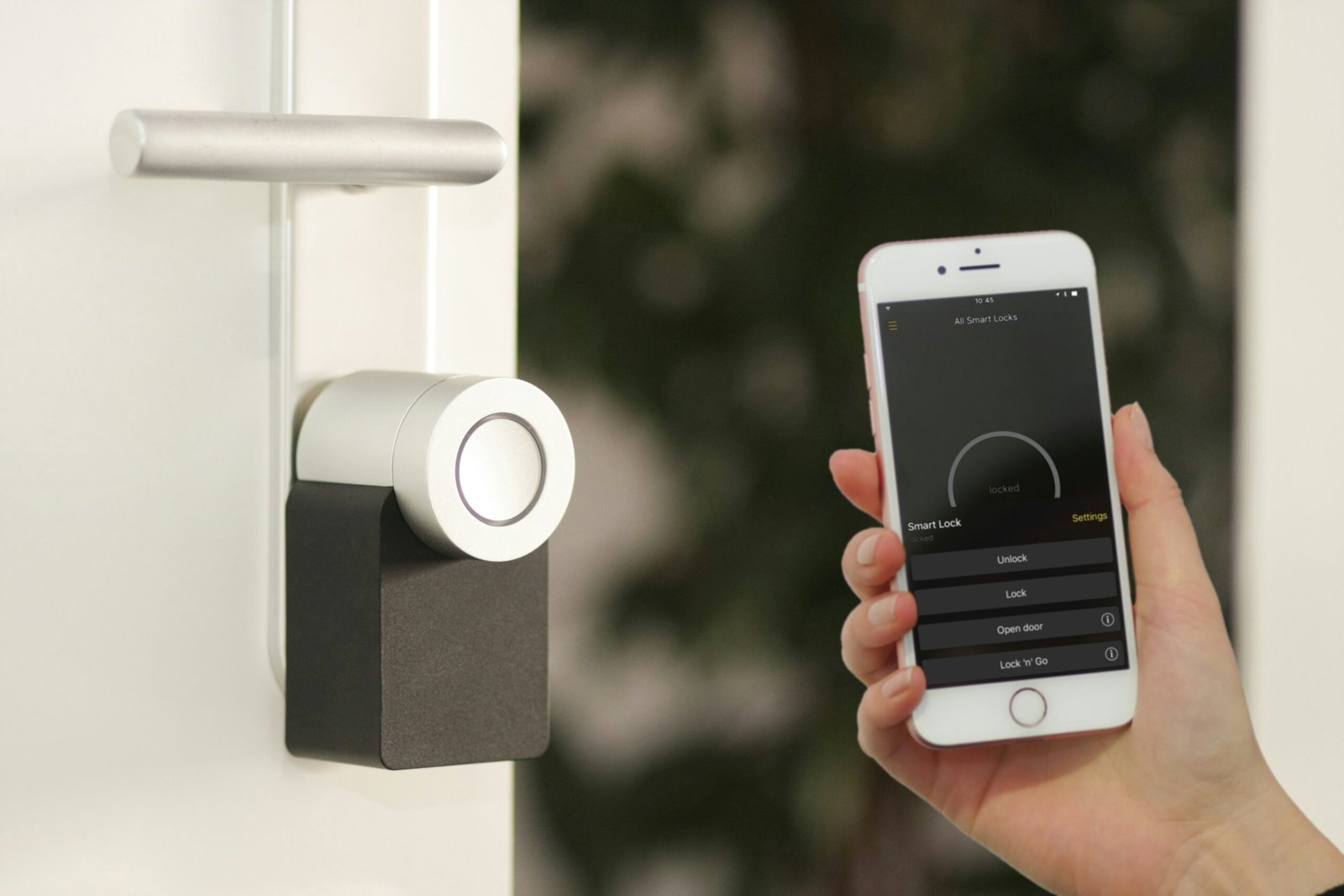
Smart locks let you unlock your door with a code, app, fingerprint or key fob, and you can give temporary access to guests, cleaners or family.
Benefits
- No more lost keys.
- Temporary codes for visitors.
- Activity logs of who entered and when.
- Auto-lock features for peace of mind.
What to check
Compatibility with your door type is vital, as UK and US lock designs differ substantially, and many UK doors use euro cylinder or multipoint locks. Confirm that the product fits before purchase. Always keep a physical or backup method of entry in case of battery failure or connectivity problems, and consider insurer requirements, since some home insurance policies specify lock standards.
Smart Plugs: Cheap and Surprisingly Useful
A smart plug turns an ordinary appliance into a controllable one. Use it with lamps, fans, coffee makers and holiday lights. Some models monitor energy use, which helps you identify power-hungry devices.
Safety first: choose plugs from reputable brands with recognised safety certification for your region, and do not overload them. Avoid using them with high-power heating appliances unless the plug is rated for it.
Smart Smoke, CO and Water Leak Detectors
Safety-focused devices are among the most valuable in a smart home. Connected smoke and carbon monoxide alarms can send alerts to your phone when you are away, and water leak sensors can warn you of a burst pipe or washing machine leak before major damage occurs.
Important: smart alarms should meet the safety standards required in your country and complement, not replace, properly installed and tested alarms. Check local requirements and test them regularly.
Robot Vacuums and Cleaning Devices
Robot vacuums have improved with better navigation, obstacle avoidance and mapping. Brands like iRobot, Roborock, Eufy and Dreame are widely discussed, and some models include mopping and self-emptying docks.
Consider: the real-world cleaning performance on your type of flooring, ongoing costs such as filters and bags, the quality of the app and how the company handles map and home-layout data. Camera-equipped models raise extra privacy questions, so read the data policy.
Smart Displays, Frames and Other Extras
Beyond the basics, there are plenty of other devices that can make life easier: smart blinds, garage door controllers, smart sprinklers and irrigation controllers, air-quality monitors and connected appliances. Add them gradually, based on real needs, rather than buying everything at once.
Security and Privacy: Do Not Skip This
Every connected device is a potential entry point, so a smarter home should also be a safer one.
- Secure your router with a strong password and current firmware.
- Use a separate network for smart devices where possible.
- Enable multi-factor authentication on your device accounts.
- Keep firmware updated and replace unsupported devices.
- Check the manufacturer’s security track record and update policy.
- Review privacy settings for microphones, cameras and data sharing.
- Prefer local control where available, which reduces reliance on the cloud.
Regulations around connected-device security in the UK and elsewhere are developing, so look for brands that clearly state how long they will provide security updates.
How to Build a Smart Home Without Overspending
- Pick your ecosystem. Decide on Alexa, Google, Apple or SmartThings first.
- Start with a few high-value devices. Smart lighting, a thermostat or a video doorbell are common starting points.
- Check compatibility before every purchase, including Matter and Thread support.
- Count subscription costs. Cameras and some other devices have ongoing fees.
- Automate gradually. Begin with simple routines, such as lights on at sunset.
- Plan for the long term. Choose brands with a track record of support.
- Wait for sales on non-urgent purchases, as smart home devices are frequently discounted.
Smart Home Device Ideas by Goal
| Goal | Good starting devices |
|---|---|
| Save energy | Smart thermostat, smart plugs with energy monitoring, smart bulbs |
| Improve security | Video doorbell, smart lock, indoor and outdoor cameras |
| Boost convenience | Smart speaker, robot vacuum, voice-controlled lighting |
| Increase safety | Smart smoke and CO alarms, water leak sensors |
| Prepare for the long term | Matter-compatible devices, a Thread border router |
Final Thoughts
The best smart home devices in 2026 are the ones that fit your lifestyle and work together reliably. Start by choosing an ecosystem, then add devices that tackle genuine needs: smart lighting for convenience, a thermostat for efficiency, a video doorbell and lock for security, and safety sensors for peace of mind.
Keep security and privacy in mind from day one, favour reputable brands with clear update policies, and build gradually. A thoughtful, well-secured smart home can make daily life easier, safer and more efficient, and it does not need to cost a fortune if you plan carefully and verify current specifications and prices before you buy.